October 21, 2026
AI Photo Organizer iPhone: How It Works and What to Pick
An iPhone owner staring at a nearly full camera roll needs an AI photo organizer that groups similar shots for review, not just another duplicate counter, especially with an average iOS library of approximately 2,400 photos. After being told that Apple's Duplicates album only catches exact copies and can take days to populate, the practical question is what a dedicated organizer adds without putting important photos at risk.
The useful answer isn't "more AI." It's a clearer decision process: which images belong together, which differences matter, and what happens across the photo library after a deletion.
Table of Contents
- The iPhone Camera Roll Problem an AI Organizer Is Built to Solve
- How On-Device AI Groups Similar Photos
- What the iPhone Photos App Already Does for You
- On-Device Versus Cloud AI Photo Analysis
- Smart Categories and the Types of Clutter AI Can Surface
- The Real Cost of Deleting a Photo on iPhone
- Choosing an AI Photo Organizer for Your iPhone
The iPhone Camera Roll Problem an AI Organizer Is Built to Solve
The storage warning often arrives at an inconvenient moment: a family photo, a vacation video, or a screenshot that matters. Opening Photos reveals the harder problem. The library contains memories mixed with temporary images, repeated attempts, and clips that nobody has reviewed.
That accumulation isn't unusual. An industry estimate of global photography and device libraries put the average iOS library at approximately 2,400 photos and projected 1.93 trillion photographs worldwide in 2024, with smartphones accounting for more than 94%. These are estimates, not measurements of every device, but they explain why manual review can feel exhausting.
The familiar storage-warning moment looks something like this.

The Problem Is Choosing, Not Just Finding
A duplicate finder answers a narrow question: which files repeat? An organizer has a harder job, helping someone compare photos that share a subject but preserve different details.
Consider a sunset sequence. One frame has sharper clouds, another includes a person's silhouette, and another has warmer exposure. Those aren't necessarily interchangeable memories, even if an algorithm groups them together.
A useful cleanup process separates different decisions:
- Repeated shots: Compare expressions, framing, and meaningful details before choosing a keeper.
- Blurry frames: Check whether a technically imperfect image is still the only record of a moment.
- Screenshots: Decide whether the information remains useful.
- Large videos: Review storage-heavy material separately from ordinary photos.
Organization and Storage Aren't the Same Goal
A cleaner library can be easier to browse without producing dramatic storage savings. Conversely, removing an unwanted video may matter more for storage than reviewing a long run of small images.
The right starting point is the owner's goal: easier browsing, less repetition, or more available space. Each goal calls for a different review order.
Practical rule: AI should shorten the list of decisions, not make meaningful decisions disappear.
Local processing should also be an expectation worth checking before granting photo access. Personal libraries contain more than scenery, including documents, children's photos, and private screenshots. Convenience shouldn't require an unexplained upload.
How On-Device AI Groups Similar Photos
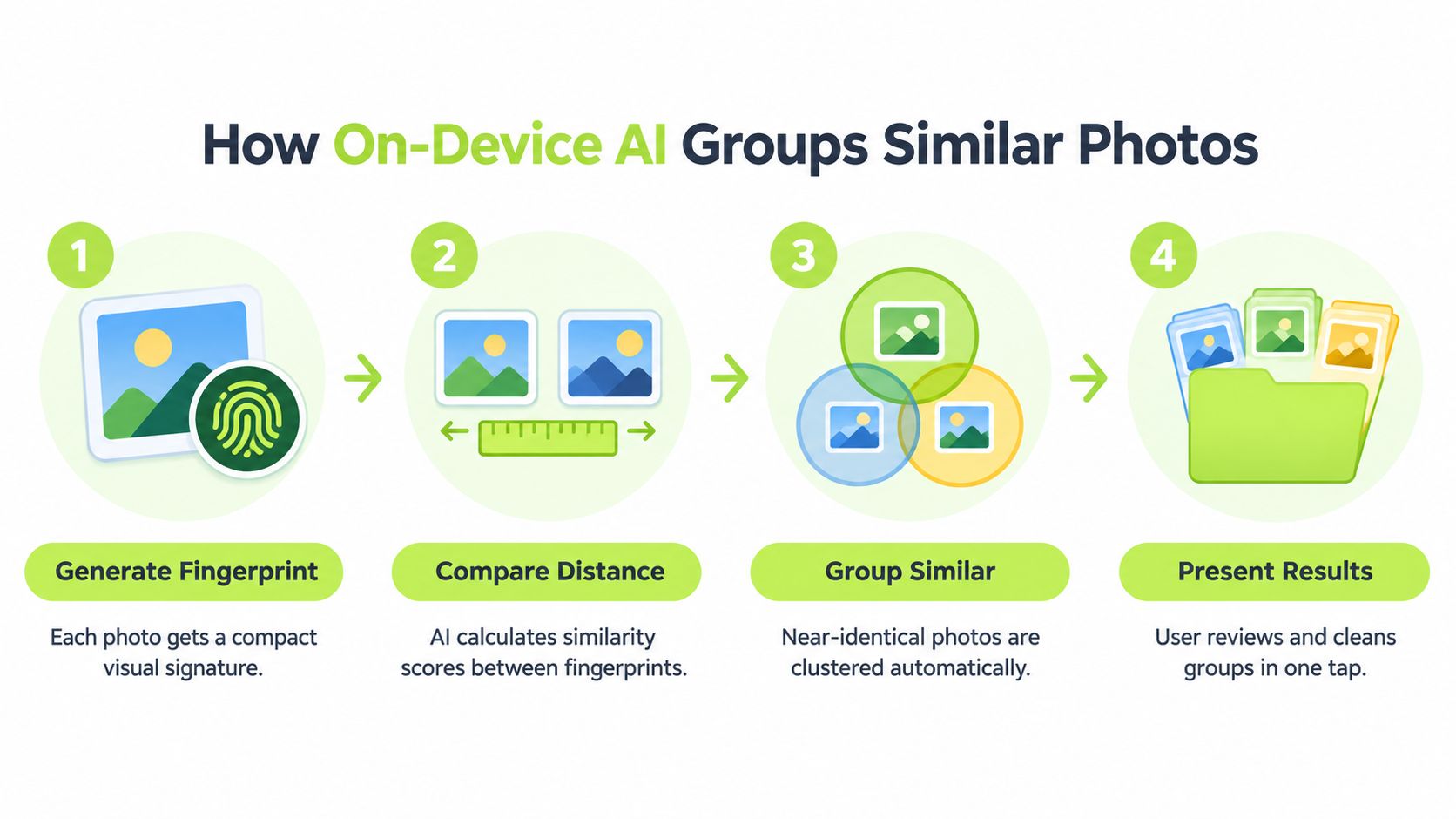
A visual fingerprint is more like a compact description than a miniature photograph. Instead of comparing every pixel directly, an image model produces a representation of visual content that software can compare with another representation.
A plain-language analogy is a set of overlapping traits: beach, orange sky, dark horizon, person near the edge. Actual models don't necessarily create that readable list, but the analogy explains why different crops of the same scene can still end up close together.
The workflow separates image comparison from the owner's final choice.
A Distance Score Isn't a Duplicate Verdict
Apple's Vision documentation on image similarity describes feature prints, compact representations generated by a neural network. Software compares VNFeaturePrintObservation objects using computeDistance; a smaller distance indicates greater semantic similarity.
That score isn't a probability that deletion is safe. It answers a visual-comparison question, not a personal-value question.
A cropped portrait and its original might be close in visual content while serving different purposes. Similar photographs of a pet might differ mainly in an expression that matters enormously to the owner.
An exact duplicate and a similar photo therefore require different review standards. Matching content closely enough to form a group doesn't establish that every member is expendable.
The Decision Layer Matters More Than the Score
A conservative organizer should combine visual similarity with context rather than treating a threshold as a deletion instruction:
- Capture context: Nearby capture times can help identify repeated attempts at the same scene.
- Image characteristics: Dimensions and burst information can help explain differences within a group.
- Owner choices: Favorites and edited versions deserve particular care.
- Complete previews: Every proposed removal should remain available for inspection.
The threshold also needs calibration. A setting that groups vacation scenery sensibly might create confusing groups in a library full of product photos or scanned documents.
For an everyday user, the useful test is simple: does the group make sense, and are the differences easy to inspect? A tool that displays related images clearly can save effort even when its recommendation isn't the owner's preferred choice.
The infographic's final review stage is the key one. A convenient action is valuable only after the owner understands what it will remove.
What the iPhone Photos App Already Does for You
Apple Photos already performs substantial image analysis. A dedicated organizer shouldn't receive credit for inventing capabilities that the iPhone already provides.
Apple's Photos privacy documentation describes local machine learning for scene classification, identifying people and pets, analyzing photo quality, and supporting Memories, Sharing Suggestions, People & Pets, and Featured Photos. Apple also states that it doesn't access users' photos or videos for research and development.
Recognition Isn't the Same as Cleanup
Those features primarily help someone find and rediscover images. Recognizing a dog, identifying a person, or assembling a memory doesn't settle whether a photograph should be removed.
That distinction explains why Photos can feel intelligent while the camera roll still feels untidy.
| Existing capability | Useful purpose | Remaining owner decision |
|---|---|---|
| Scene and object recognition | Finding images by subject | Which results still matter |
| People & Pets | Bringing familiar subjects together | Which repeated moments deserve keeping |
| Memories and Featured Photos | Rediscovering selected images | Whether unfeatured images are unnecessary |
| Duplicates review | Reviewing duplicate candidates | Whether another version has value |
The Duplicates album is a sensible place to start, but it shouldn't become the benchmark for every cleanup task. A duplicate-focused workflow and a comparison of alternate expressions solve different problems.
Likewise, an empty or incomplete-looking collection doesn't establish that a library contains no clutter. The owner may still have outdated screenshots, unwanted clips, and repeated compositions that need deliberate review.
Keep the Useful Division of Labor
Photos can remain the main place for browsing and enjoying the library. A dedicated cleanup interface can serve as a temporary workbench for comparing candidates and making removal decisions.
The practical guide to organizing photos on iPhone provides a broader organizing workflow. Cleanup works better when it supports a usable library rather than becoming an endless attempt to remove everything that isn't technically perfect.
- Use existing recognition first: A search or familiar-person grouping may already locate the desired material.
- Add a cleaner for a specific gap: Similar-shot comparison or focused clutter review should solve an identifiable frustration.
- Keep subjective choices personal: A featured image isn't automatically more important than an unfeatured one.
The strongest reason to add another app is a better decision interface, not merely a longer feature list.
On-Device Versus Cloud AI Photo Analysis
On-device analysis and cloud analysis describe where the work happens. They don't, by themselves, establish whether an app is accurate, affordable, or pleasant to use.
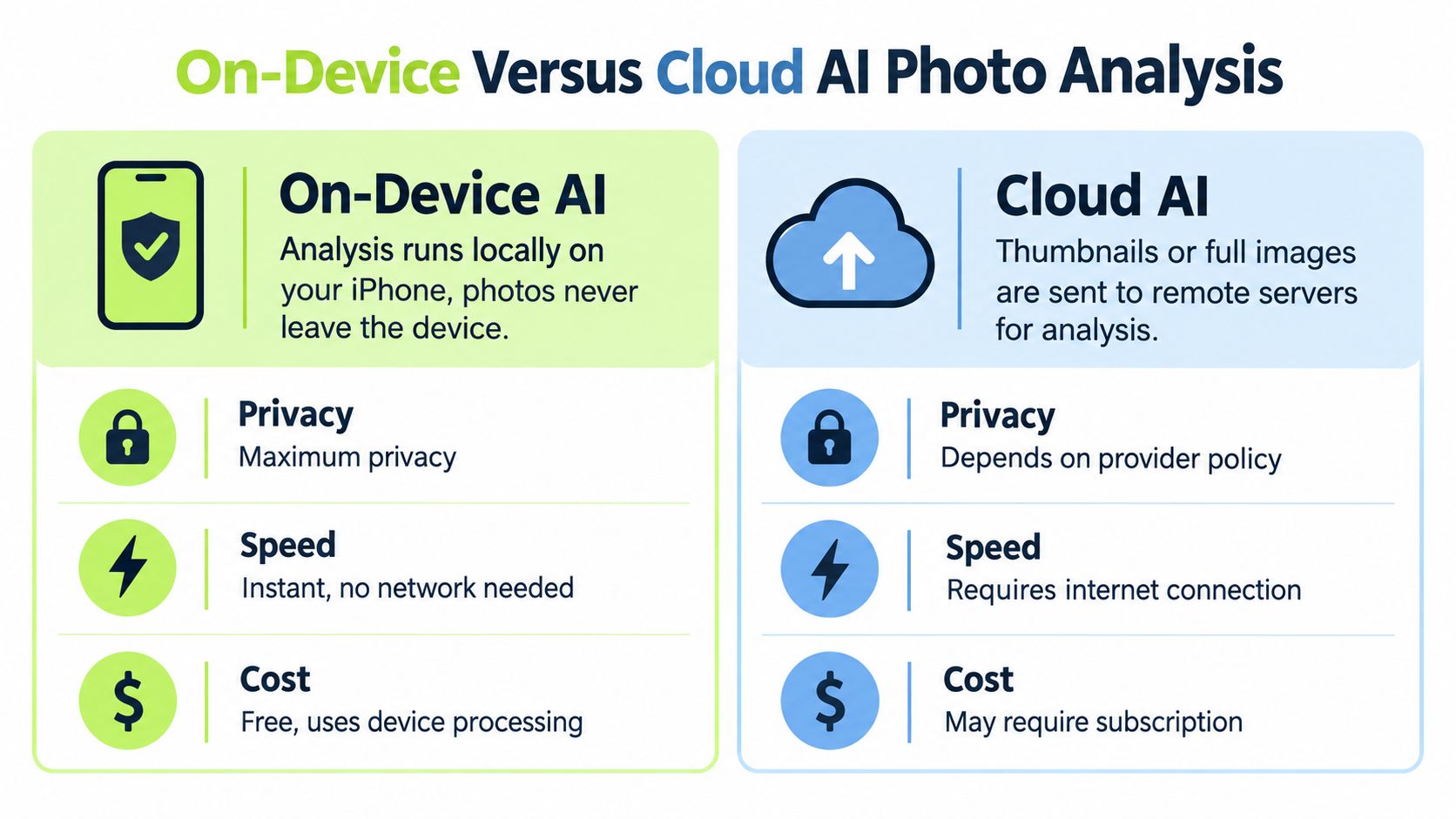
A local model processes image content on the phone. A cloud-analysis workflow sends the content needed for analysis, potentially thumbnails or full images, to remote infrastructure. Before installation, the important question is exactly what leaves the device and why.
This comparison illustrates the architectural distinction, but speed and pricing still need separate evaluation.
Local Doesn't Mean Instant or Automatically Free
Apple's Core ML documentation explains that models can execute on the device using its CPU, GPU, and Neural Engine. Strictly local execution doesn't require a network connection for inference.
That makes offline analysis technically practical, but the phone still has work to do. Reviewing a large library requires processing time, and responsible engineering must account for memory, battery use, and heat.
The graphic's simplified speed and cost labels shouldn't be treated as promises. Local analysis isn't necessarily instant, and local software can still require payment. Remote analysis isn't automatically faster once uploading and connectivity enter the picture.
For a reader comparing offline behavior, the offline photo organizer guide addresses that requirement specifically.
Privacy Depends on the Complete Design
Apple's privacy documentation also describes safeguards for specific cloud-connected Photos functions, including differential privacy, homomorphic encryption, and an Oblivious HTTP relay. Those protections illustrate why “cloud” isn't a sufficient verdict of either safe or unsafe.
The companion video offers another format for considering the workflow.
An app's own disclosures should answer these questions:
- Image transfer: Are originals, thumbnails, or derived representations transmitted?
- Retention: What remains on remote systems after processing?
- Offline operation: Which cleanup functions work without connectivity?
- Other data: Are account details or optional telemetry collected separately?
Apple's privacy features overview confirms that face, scene, and object recognition can happen entirely on iPhone. That establishes what's possible, not what every third-party developer implements.
Smart Categories and the Types of Clutter AI Can Surface
A category is a review filter, not a verdict. A screenshot may preserve a critical message; a receipt may document a purchase that still matters; a blurry photo may contain an irreplaceable memory.
That's why a useful organizer separates classification, suggestion, and deletion. Classification describes an image, a suggestion proposes an action, and deletion changes the library.
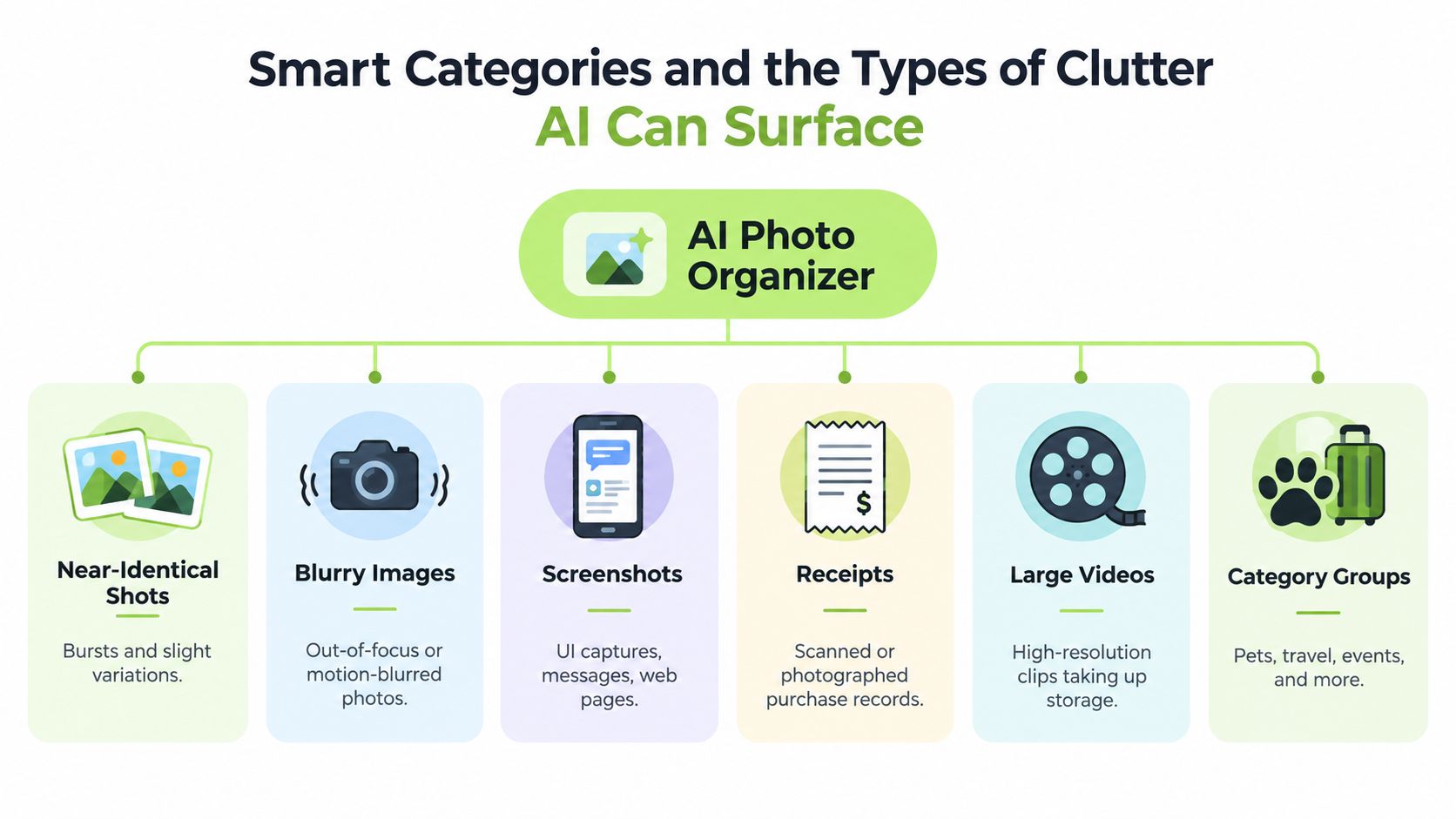
The category map illustrates the kinds of review queues an organizer can provide.
Start With the Reason an Image Might Be Unnecessary
Near-identical shots call for comparison. The owner should inspect facial expressions, focus, framing, and whether each version records a distinct moment.
Blur candidates need a different question: is there a better replacement? A technically weak photo shouldn't be removed merely because software detected softness.
Temporary information needs a usefulness check instead:
- Screenshots: Confirm that an address, message, or saved instruction is no longer needed.
- Receipts: Check warranty, reimbursement, or recordkeeping needs before removal.
- Large videos: Preview the content and decide whether keeping the original quality matters.
A category describes what a photo contains. Only its owner can decide what it means.
Subject Groups Help Narrow Attention
Pets, Travel, Food, and Architecture are useful examples of possible classification groups. These aren't clutter categories by nature. They give an owner a smaller, more coherent set of images to review.
A travel group, for example, might contain both cherished vacation photos and temporary reference images. A food group might mix meaningful family occasions with forgotten menu snapshots.
The same principle applies to date-based rediscovery. On This Day-style memories and flashback periods can be useful review patterns, but a calendar match isn't evidence that anything should be deleted. Their value is bringing overlooked material back into consideration.
For anyone evaluating an app, category names matter less than the available controls. Can mistakes be ignored? Can related images be compared? Is the proposed removal clearly separated from the remaining group?
A sensible first session focuses on a familiar category whose contents are easy to judge. Emotionally significant event photos deserve slower review than expired reference screenshots.
The Real Cost of Deleting a Photo on iPhone
A deletion count isn't a storage measurement. Removing many items can produce a disappointing change in available space, while a seemingly small action can affect photographs on several devices.
Deletion scope means understanding both where the action applies and whether recovery remains possible. That deserves attention before any large cleanup.
A Local Tap Can Affect a Synchronized Library
Apple's guidance on deleting photos across devices and shared libraries explains that deletion with iCloud Photos enabled applies across devices using the same Apple Account. Deleting from Photos isn't the same as removing only a disposable copy from the current iPhone.
Shared Photo Library introduces another permission boundary. Participants can edit or delete shared items, but only the person who contributed an item can permanently delete or recover it.
A practical preflight check should therefore establish:
- Synchronization: Is iCloud Photos enabled for the library being changed?
- Ownership: Does the selection include Shared Photo Library content?
- Independent copies: Are any irreplaceable originals preserved separately?
- Selection scope: Does the confirmation describe the actual items intended for removal?
Before permanent removal: A synchronized library should be treated as a shared set of originals, not a collection of unrelated device copies.
Recently Deleted Changes the Storage Calculation
According to Apple's photo and video deletion guidance, deleted items normally remain in Recently Deleted for 30 days, and owners can permanently remove them sooner. Apple also warns that when iCloud storage is exceeded, deleted items may be removed immediately rather than remaining recoverable.
That exception matters. The recovery window shouldn't be treated as an unconditional backup guarantee.
The explanation of Recently Deleted and storage helps distinguish a pending deletion from completed removal. After cleanup, the owner should verify actual storage in iPhone Storage and review Recently Deleted rather than trusting an item counter.
Optimized local storage further complicates estimates: an original file's size isn't necessarily the amount currently occupying the phone. Permanent removal also gives up the usual recovery opportunity, so emptying Recently Deleted shouldn't be a reflex.
Compression Is a Separate Decision
Apple's video storage guidance describes lower-resolution iMovie exports at 720p, 540p, and 360p, compared with the default 1080p HD, and recommends High Efficiency for smaller files. Lowering resolution changes the exported dimensions and may reduce visible detail.
Compression creates a storage-saving version; it doesn't make an original automatically unnecessary. The owner should preview the export before deciding what to retain.
Choosing an AI Photo Organizer for Your iPhone
The most useful AI photo organizer for iPhone is one whose recommendations remain understandable. Accuracy matters, but so do clear previews, predictable permissions, and a visible boundary between a suggestion and a library change.
A sensible comparison starts with the required job. Someone who mainly needs rediscovery may already have sufficient tools, while someone facing repeated shots may benefit from a dedicated review interface.
Quick comparison of common AI photo organizer approaches on iPhone
| Approach | Where Analysis Runs | What It Catches | Deletion Control | Typical Pricing |
|---|---|---|---|---|
| Built-in Photos organization | Local analysis, with some cloud-connected functions | Recognized subjects, people, pets, and duplicate review | Owner reviews library actions | Built-in functionality |
| Local AI cleanup | On the iPhone | Depends on the app's supported cleanup groups | Confirm swipe and removal behavior | Check free allowances and optional subscriptions |
| Cloud-assisted organization | Remote infrastructure for cloud analysis | Depends on the service | Check synchronization and deletion scope | Check service and storage terms |
| Manual review | Owner inspects images on the phone | Anything the owner identifies | Direct owner decisions | No separate cleaner required |
LuminaClean is an iOS-only option that scans on the iPhone for exact duplicates, visually similar photos, blurry photos, screenshots, and large videos, and includes free video compression. Its analysis is 100% on-device, photos never leave the iPhone for processing, no account is needed, and nothing is deleted without the user's swipe or confirmation.
The same listing offers 65 free deletes initially and 10 more daily, with an optional Premium subscription for clearing a larger backlog. Its mascot, Lumina, adds a playful Get Judged interaction around the worst photo pile, but the owner still controls removal.
A Checklist Worth Saving
- Privacy: Identify what, if anything, leaves the phone.
- Coverage: Confirm support for the actual problem, not just duplicate detection.
- Review: Check whether differences remain visible before removal.
- Scope: Understand synchronized and shared-library consequences.
- Cost: Read the free allowance and subscription terms before a large session.
- Verification: Compare actual storage afterward, not merely the deletion count.
A cautious trial with expendable material reveals more than an ambitious cleanup promise. The owner should be able to explain every proposed action before approving it.
Before installing a cleaner, the iPhone owner should check iCloud Photos and Shared Photo Library settings, then choose a small, familiar review group. Comparing the candidates, confirming only unwanted items, and checking the resulting storage provides a practical test of whether the tool makes cleanup clearer without taking control away.
Clean up your camera roll in minutes.
LuminaClean scans on-device, groups duplicates, similar shots, screenshots and blurry photos, and deletes only what you confirm. Free to start, no account.